









As web applications become larger and more complex, writing and maintaining JavaScript code can become increasingly challenging. More features mean more components, more APIs, more business logic, and more developers working on the same codebase.
This is where TypeScript becomes valuable.
TypeScript extends JavaScript with static typing and other features that help developers identify errors earlier, write more predictable code, and maintain large applications more easily.
Today, TypeScript is widely used for modern frontend and backend development, particularly in applications built with technologies such as React, Next.js, and Node.js.
In this guide, we’ll explain what TypeScript is, how it differs from JavaScript, its key benefits, and when you should consider using it.
What Is TypeScript?
TypeScript is an open-source programming language developed by Microsoft.
It is a superset of JavaScript, which means that JavaScript code can generally be used within a TypeScript project.
The main difference is that TypeScript adds a type system and several additional development features on top of JavaScript.
For example, a simple JavaScript function might look like this:
function add(a, b) {
return a + b;
}
function add(a: number, b: number): number {
return a + b;
}
With TypeScript, we can explicitly define the expected types:
Now the developer, editor, and TypeScript compiler know that the function expects two numbers and returns a number.
If an incorrect value is passed, TypeScript can identify the problem during development.
TypeScript vs JavaScript
The easiest way to understand the relationship is:
- JavaScript is a programming language used to build dynamic applications.
- TypeScript extends JavaScript with additional features, most importantly static typing.
JavaScript is dynamically typed. A variable can hold different types of values during runtime.
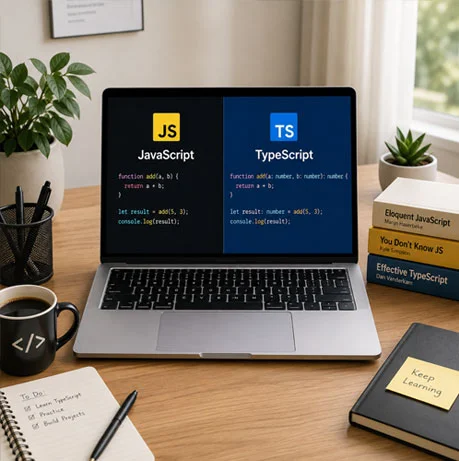
For example:
let value = “Hello”;
value = 100;
TypeScript allows developers to define the expected type:
let value: string = “Hello”;
JavaScript allows this kind of behavior.
Attempting to assign a number to this variable will result in a type error during development.
This additional layer of checking becomes increasingly useful as an application grows.
Why Was TypeScript Created?
JavaScript started as a relatively small scripting language, but it has evolved into one of the primary languages used for modern application development.
Large JavaScript applications introduced new challenges.
Developers began working with:
- Large codebases
- Complex business logic
- Multiple developers
- Numerous dependencies
- Large API integrations
- Shared data structures
- Reusable components
As applications grew, it became harder to determine what type of data a function expected or what properties an object contained.
TypeScript was created to address many of these challenges while remaining compatible with the existing JavaScript ecosystem.
How Does TypeScript Work?
TypeScript code does not run directly in the browser.
Instead, TypeScript is transformed into JavaScript during the build process.
The general flow looks like this:
TypeScript → Compilation/Transformation → JavaScript → Browser or Server
During development, TypeScript analyzes the code and reports type-related problems.
The resulting JavaScript can then run in environments that support JavaScript, including browsers and Node.js.
This means developers get the benefits of static type checking without requiring browsers to understand TypeScript directly.
1. Catch Errors Earlier
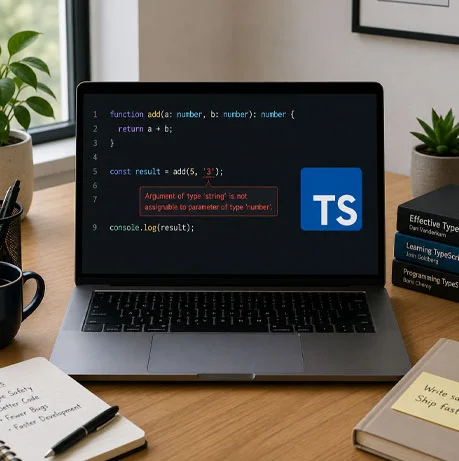
One of the biggest advantages of TypeScript is that it can identify many errors before the application is executed.
The function expects price to be a number, but a string has been provided.
TypeScript can immediately identify the problem.
Without type checking, such issues may only become apparent during runtime or testing.
Catching problems earlier can reduce debugging time and prevent avoidable production issues.
Consider this example:
function calculateTotal(price: number, quantity: number) {
return price * quantity;
}
calculateTotal(“100”, 2);
2. Provides Static Type Checking
Static typing allows developers to define what kind of data a variable, function, or object should contain.
For example:
let productName: string;
let productPrice: number;
let available: boolean;
interface Product {
id: number;
name: string;
price: number;
available: boolean;
}
You can also define more complex structures:
This creates a clear contract for how a Product should look.
If another part of the application tries to use the object incorrectly, TypeScript can highlight the problem.
3. Improves Code Completion
TypeScript provides development tools with additional information about your code.
Modern editors such as Visual Studio Code can use this information to provide:
- Autocomplete
- Intelligent suggestions
- Function parameter information
- Property suggestions
- Type checking
- Navigation to definitions
- Refactoring support
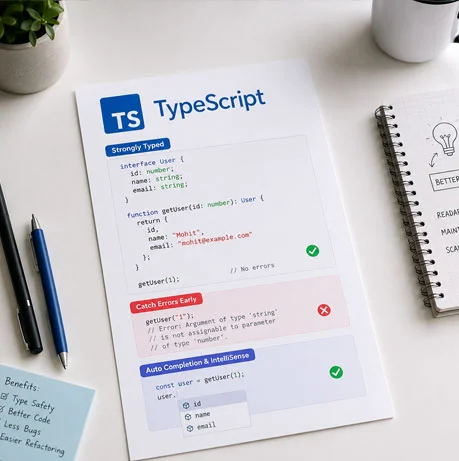
For example, if you have:
interface User {
id: number;
name: string;
email: string;
}
and write:
user.
your editor can immediately suggest id, name, and email.
This makes development faster and reduces the need to constantly search through the codebase.
4. Makes Large Codebases Easier to Maintain
One of the biggest challenges with large applications is understanding existing code.
A function may have been written months or years ago by another developer.
Without type information, developers may need to trace multiple files to understand what the function expects.
With TypeScript, the expected structure can be defined directly:
The function’s requirements are immediately clear.
This becomes especially valuable when multiple developers work on the same project.
interface User {
id: number;
name: string;
email: string;
}
function createUser(user: User) {
// …
}
5. Makes Code Easier to Understand
TypeScript can make code more self-explanatory.
Consider:
function updateUser(data) {
// …
}
A developer reading this code has no immediate information about what data should contain.
Compare that with:
interface UpdateUserData {
name?: string;
email?: string;
}
function updateUser(data: UpdateUserData) {
// …
}
The second version communicates much more information without requiring additional documentation.
This can make onboarding and long-term maintenance easier.
6. Improves Function Safety
Functions are used throughout almost every application.
TypeScript allows developers to define:
- Parameter types
- Return types
- Optional parameters
- Union types
- Generic parameters
This tells developers exactly what the function expects and what it should return.
For example:
function getUser(id: number): User {
// …
}
For larger applications, this creates clear boundaries between different parts of the codebase.
7. Interfaces and Type Aliases
TypeScript provides multiple ways to describe data structures.
These definitions can then be reused throughout the application.
This is particularly useful when the same data structure is used by multiple components, services, or API functions.
Interfaces are commonly used for objects:
interface Customer {
id: number;
name: string;
email: string;
}
Type aliases can also be used:
type Customer = {
id: number;
name: string;
email: string;
};

8. Type Inference Reduces Unnecessary Code
TypeScript does not require developers to specify every type manually.
It can often determine the type automatically.
For example:
const name = “John”;
const age = 30;
TypeScript can infer that:
- name is a string
- age is a number
This is called type inference.
As a result, developers can benefit from type safety without having to add type annotations everywhere.
9. Supports Advanced Types
TypeScript provides features that are particularly useful for complex applications.
These include:
- Union types
- Intersection types
- Generics
- Utility types
- Literal types
- Conditional types
- Type narrowing
For example, a value can be restricted to a specific set of options:
type Status = “pending” | “approved” | “rejected”;
Now a variable using this type can only contain one of those three values.
This can prevent many common mistakes when working with application states
10. Generics Make Code Reusable
Generics allow developers to create reusable code while preserving type information.
For example:
function getFirst<T>(items: T[]): T {
return items[0];
}
Generics are particularly useful when building reusable:
- Functions
- Components
- Utilities
- API helpers
- Data structures
The function can work with different types while still maintaining type safety.
This makes them an important part of larger TypeScript applications.
11. Safer API Integration
Modern applications frequently communicate with APIs.
For example, an API might return:
{
“id”: 101,
“name”: “John”,
“email”: “john@example.com”
}
The corresponding TypeScript type could be:
interface User {
id: number;
name: string;
email: string;
}
The application can then consistently work with that structure.
For larger projects, TypeScript can also be combined with tools that generate types from API specifications such as OpenAPI or GraphQL schemas.
This can help keep frontend and backend data contracts aligned.
12. TypeScript with React and Next.js
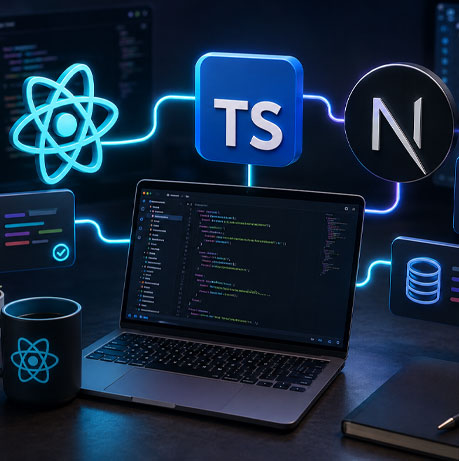
TypeScript works particularly well with modern React-based applications.
React applications commonly contain:
- Components
- Props
- State
- Hooks
- Forms
- API responses
- Context
- Shared data models
For example:
interface ButtonProps {
label: string;
disabled?: boolean;
onClick: () => void;
}
TypeScript can define the expected structure of these elements.
A React component can use these properties with much greater confidence.
Next.js also provides strong TypeScript support, making TypeScript a natural choice for modern Next.js applications.
13. Better Refactoring
Applications constantly evolve.
Developers may need to:
- Rename properties
- Change function parameters
- Modify API responses
- Move components
- Replace libraries
- Change business logic
These changes can be risky in large JavaScript applications.
TypeScript can identify many parts of the application that depend on a particular type or property.
Combined with modern IDE features, this makes large refactoring tasks easier and safer.
14. Better Collaboration Between Developers
Large applications are usually developed by teams rather than individuals.
Different developers may work on different parts of the system.
TypeScript creates clearer contracts between those parts.
For example, if one developer creates an API service and another developer consumes it, the expected data structure can be clearly defined.
This reduces assumptions and makes collaboration easier.
It also helps new developers understand an unfamiliar codebase more quickly.

15. TypeScript for Backend Development
TypeScript is not limited to frontend applications.
It can also be used for backend development with technologies such as Node.js and Express.
Backend applications can benefit from type safety in:
- API request objects
- API responses
- Database models
- Service classes
- Configuration
- Authentication data
- Business logic
Using TypeScript across frontend and backend applications can also provide consistency in how shared data structures are represented.
Does TypeScript Improve Application Performance?
TypeScript itself does not automatically make an application faster.
TypeScript is primarily a development-time technology. It is transformed into JavaScript before the application runs.
Therefore, the main benefits are related to:
- Code quality
- Maintainability
- Developer productivity
- Error detection
- Scalability
Actual application performance still depends on factors such as application architecture, database queries, network requests, JavaScript bundle size, caching, rendering strategies, and server performance.
Are There Any Disadvantages to TypeScript?
TypeScript has many advantages, but it is not without trade-offs.
There is an initial learning curve for developers who are only familiar with JavaScript.
Developers may need to understand concepts such as:
- Interfaces
- Generics
- Type narrowing
- Union types
- Type inference
- Compiler configuration
TypeScript can also add complexity when types are unnecessarily complicated.
The goal should not be to add types everywhere simply because TypeScript allows it.
Good TypeScript code uses types to make the application clearer and safer without creating unnecessary complexity.
When Should You Use TypeScript?
TypeScript is particularly useful when:
- The application is expected to grow
- Multiple developers are working on the project
- The application contains complex business logic
- There are many API integrations
- Long-term maintenance is important
- The codebase requires frequent refactoring
- The application is expected to scale
For a small prototype or short-lived script, JavaScript may be perfectly sufficient.
For a long-term production application, TypeScript can provide significant benefits.
Final Thoughts
TypeScript has become an important part of modern web development because it adds structure and type safety to JavaScript without replacing the language itself.
It helps developers:
- Catch errors earlier
- Understand code more easily
- Improve code completion
- Build maintainable applications
- Refactor with greater confidence
- Work more effectively in teams
- Manage large codebases
- Build safer API integrations
For small projects, JavaScript may still be enough. But as an application grows in size and complexity, TypeScript can significantly improve the development and maintenance experience.
For modern applications built with React, Next.js, Node.js, and other JavaScript-based technologies, TypeScript is a strong choice for building reliable, scalable, and maintainable software.
Let’s Talk
Discover how TypeScript adds type safety, improves code quality, and makes JavaScript development more reliable, scalable, and easier to maintain.