









Modern web applications need a reliable backend to handle requests, process business logic, communicate with databases, integrate with external services, and return data to users.
JavaScript is no longer limited to running inside a web browser. With Node.js, developers can use JavaScript to build server-side applications, APIs, real-time systems, and backend services.
Express.js builds on top of Node.js by providing a lightweight framework for handling common web application requirements such as routing, middleware, and HTTP requests.

Although Node.js and Express.js are often mentioned together, they are not the same thing.
In this guide, we’ll explain what Node.js and Express.js are, how they work together, their key differences, and when this combination makes sense for modern web development.

What Is Node.js?
Node.js is an open-source, cross-platform JavaScript runtime built on Google’s V8 JavaScript engine. It allows JavaScript code to run outside of a web browser, making it possible to use JavaScript for server-side development.
Before Node.js, JavaScript was primarily associated with frontend development.
Node.js changed that by allowing developers to use JavaScript on the server.
This means JavaScript can be used to build:
- Web servers
- REST APIs
- Backend services
- Real-time applications
- Command-line tools
- Microservices
- Automation tools
Node.js also provides built-in capabilities for working with HTTP, files, networking, streams, and other system-level functionality.
What Is Express.js?
Express.js is a lightweight web application framework built for Node.js.
The official Express documentation describes it as a fast, unopinionated, minimalist framework for Node.js. It provides features for building web applications and APIs without hiding the underlying capabilities of Node.js.
Node.js provides the runtime.
Express.js provides a convenient framework for building applications on that runtime.

Express adds features such as:
- Routing
- Middleware
- Request handling
- Response handling
- HTTP utilities
- Error handling
- Application-level configuration
This makes building APIs and web applications considerably more straightforward than implementing every piece directly with Node.js’s built-in modules.
Node.js vs Express.js
The simplest way to understand the difference is:
- Node.js is a JavaScript runtime.
- Express.js is a web framework that runs on Node.js.
Node.js allows JavaScript to run on the server.
Express.js provides tools and conventions that make it easier to build web applications and APIs using Node.js.
A simple analogy is that Node.js provides the foundation, while Express.js provides a set of tools for building a web application on that foundation.
How Do Node.js and Express.js Work Together?
A typical request might follow this flow:
Client → Express.js → Application Logic → Database/External Service → Express.js → Client
- Node.js is a JavaScript runtime.
- Express.js is a web framework that runs on Node.js.
For example, a frontend application may request:
GET /api/products
Express receives the request and determines which route should handle it.
Express provides the routing and request-handling layer, while Node.js provides the runtime in which the application executes. The official Express documentation uses the same basic model for its introductory example.
A simple Express application looks like this:
const express = require(“express”);
const app = express();
app.get(“/”, (req, res) => {
res.send(“Hello World!”);
});
app.listen(3000, () => {
console.log(“Server is running”);
});
Why Is Node.js Good for Backend Development?
One of Node.js’s most important characteristics is its asynchronous, event-driven architecture.
Node.js uses non-blocking I/O, allowing the application to continue processing other work while waiting for operations such as network requests, filesystem operations, or database activity to complete.
This makes Node.js particularly useful for applications that handle many I/O operations.

Examples include:
- API servers
- Real-time applications
- Chat applications
- Streaming applications
- Notification systems
- Applications that communicate with multiple external services
Instead of waiting synchronously for an I/O operation to finish, Node.js can continue handling other work and process the result when it becomes available.
Understanding the Event Loop
The event loop is an important part of how Node.js handles asynchronous operations
A simplified flow looks like this:
- A request reaches the Node.js application.
- JavaScript begins processing the request.
- An I/O operation is started, such as a database or network request.
- Node.js can continue processing other work instead of waiting.
- Once the operation completes, its callback or continuation can be processed.
- The application sends the response.
This architecture allows Node.js to efficiently handle many concurrent I/O-bound operations.
However, this does not mean that Node.js automatically makes every type of application faster.
CPU-intensive operations can still block the main JavaScript execution path, so applications performing heavy computation may require additional strategies such as worker threads, separate processes, queues, or other architectural approaches.
Express.js Makes API Development Easier
Node.js provides the underlying runtime and HTTP capabilities, but building a complete API directly on top of Node’s core modules can require a significant amount of boilerplate.
This makes an application’s API structure easy to understand.
Express supports routing for different HTTP methods and URL patterns, which is one of the framework’s core purposes.
Express simplifies this process.
For example, routes can be defined using familiar HTTP methods:
app.get(“/users”, getUsers);
app.post(“/users”, createUser);
app.put(“/users/:id”, updateUser);
app.delete(“/users/:id”, deleteUser);
What Is Middleware in Express.js?
Middleware is one of the most important concepts in Express.
Middleware functions can process a request before it reaches the final route handler.
They can be used for tasks such as:
- Authentication
- Authorization
- Logging
- Request validation
- Parsing request bodies
- CORS handling
- Rate limiting
- Error handling
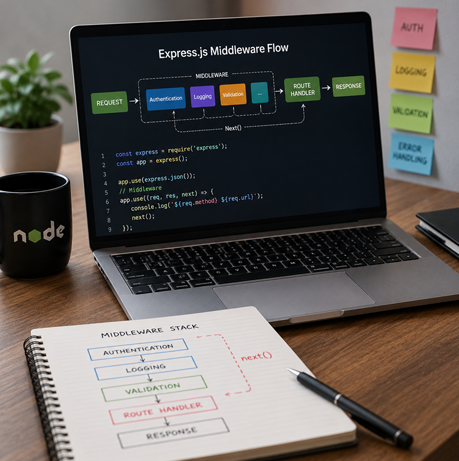
For example:
app.use(express.json());
This allows Express to parse incoming JSON request bodies.
A custom middleware function might look like:
app.use((req, res, next) => {
console.log(`${req.method} ${req.url}`);
next();
});
The next() function passes control to the next middleware or route handler.
This modular approach makes it easier to separate common application concerns.
Routing in Express.js
Routing determines how an application responds to a particular URL and HTTP method.
For example:
app.get(“/api/products”, (req, res) => {
res.json({
message: “Products retrieved successfully”
});
});
Express can also organize routes into separate routers.
/api/users
/api/products
/api/orders
/api/payments
For larger applications, developers can structure routes around different resources:
This helps keep backend code organized as the application grows.
Separating Routes, Controllers, and Business Logic
A simple Express application can place everything in one file.
That approach works for a small example, but it becomes difficult to maintain as the application grows.
Express does not force a particular application structure. Its flexibility allows teams to choose an architecture appropriate for their application and team size.
This flexibility is one of Express’s strengths, but it also means teams need to establish sensible project conventions as the codebase grows.
A larger application can separate responsibilities into layers such as:
Routes
↓
Controllers
↓
Services
↓
Data Access
↓
Database
For example:
- Routes define API endpoints.
- Controllers handle HTTP-level concerns.
- Services contain business logic.
- Data access handles database operations.
- Database stores application data.
Express.js and Databases
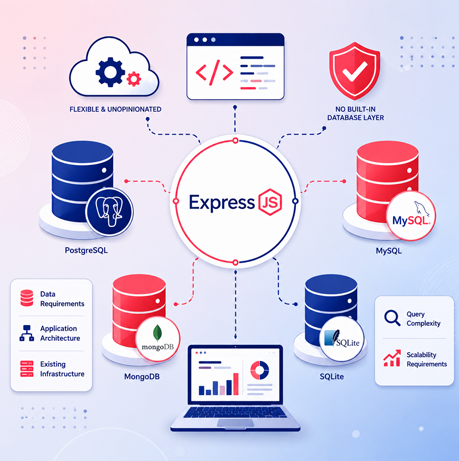
Express does not include a built-in database layer.
Instead, developers can choose the database and data-access tools that best fit their application. The official Express FAQ specifically notes that Express does not have its own database model and leaves database integration to external Node.js modules.
An Express application can therefore work with different database technologies through appropriate drivers, libraries, or ORMs.
This flexibility allows teams to select tools based on:
- Data requirements
- Application architecture
- Existing infrastructure
- Query complexity
- Scalability requirements
Building REST APIs with Node.js and Express.js
One of the most common uses of Node.js and Express.js is building REST APIs.
A typical API might expose endpoints such as:
These APIs can then be consumed by:
- Web applications
- Mobile applications
- Admin interfaces
- Third-party applications
- Internal services
GET /api/users
GET /api/users/:id
POST /api/users
PUT /api/users/:id
DELETE /api/users/:id
Express provides the routing and HTTP handling needed to implement these endpoints efficiently.
Authentication and Security
Backend applications need to protect both users and application data.
Node.js and Express.js can be used to implement common authentication approaches such as:
- Session-based authentication
- Token-based authentication
- JWT-based authentication
- OAuth integrations
Important areas include:
- Input validation
- Authentication
- Authorization
- Secure password handling
- Rate limiting
- CORS configuration
- HTTP security headers
- Dependency management
- Secure environment configuration
Express itself provides the foundation, while additional middleware and libraries can be introduced for specific security requirements.
Error Handling
Express itself provides the foundation, while additional middleware and libraries can be introduced for specific security requirements.
Express provides middleware-based error handling.
Centralized error handling helps applications return consistent responses and makes backend behavior easier to monitor and maintain.
Express defines error-handling middleware using a four-argument signature: (err, req, res, next).
For example:
app.use((err, req, res, next) => {
console.error(err);
res.status(500).json({
message: “Internal server error”
});
});
Node.js and npm
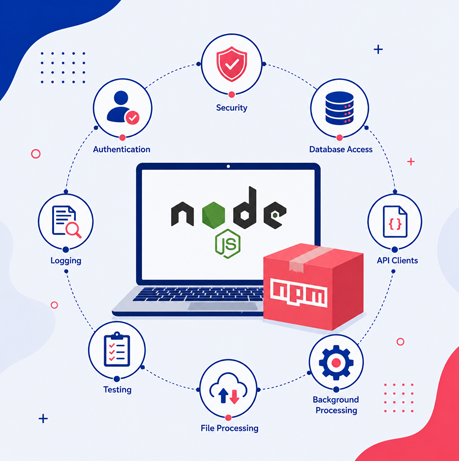
One of the major advantages of the Node.js ecosystem is npm, the package ecosystem commonly used with Node.js applications.
Developers can install packages for functionality such as:
- Authentication
- Validation
- Database access
- Logging
- Testing
- File processing
- API clients
- Security
- Background processing
For example:
npm install express
This ecosystem allows developers to build applications without implementing every capability from scratch.
However, dependencies should be selected carefully. Adding unnecessary packages can increase maintenance, security, and upgrade complexity.
Node.js and Express.js with TypeScript
Node.js and Express.js can also be used with TypeScript.
This combination is particularly useful for larger backend applications where strong typing and maintainability are important.
A TypeScript Express application can define request and response types explicitly:
Express provides documentation for using TypeScript alongside the framework, including the relevant Node.js and Express type packages.
Using TypeScript can make large backend codebases easier to understand, refactor, and maintain.
import express, {
type Request,
type Response
} from “express”;
const app = express();
app.get(“/users”, (req: Request, res: Response) => {
res.json([]);
});
Scalability and Performance
Node.js is designed for scalable network applications and is particularly well suited to workloads involving many concurrent I/O operations.
However, scalability does not come automatically from choosing Node.js.
A scalable application also depends on:
- Efficient database queries
- Caching
- Proper API design
- Connection management
- Background jobs
- Load balancing
- Horizontal scaling
- Monitoring
- Efficient application architecture
Node.js can support these approaches, but the overall architecture determines how well the system scales.
Express’s lightweight nature also gives teams considerable freedom to design the architecture around their requirements rather than forcing a large framework structure.
Node.js vs Traditional Backend Technologies
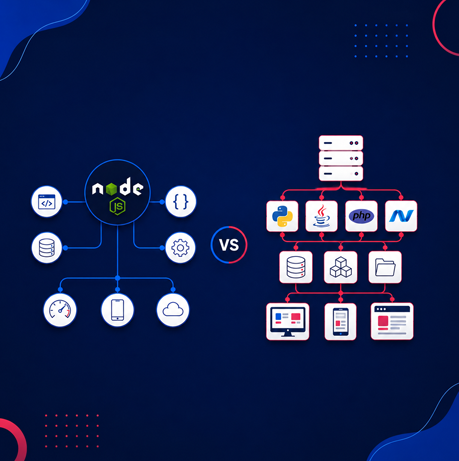
One of Node.js’s biggest advantages is that it allows JavaScript developers to work on both frontend and backend systems.
A team can use JavaScript or TypeScript throughout the application stack.
This can reduce context switching and make it easier to share concepts, validation rules, data models, and development practices between frontend and backend teams.
Node.js is especially attractive when an application has a strong need for:
- API-driven architecture
- Real-time communication
- High numbers of concurrent I/O operations
- Rapid development
- Shared JavaScript or TypeScript expertise
That does not mean Node.js is the best backend technology for every application. The right choice depends on workload, team expertise, architecture, and business requirements.
When Should You Use Node.js and Express.js?
Node.js and Express.js are a strong combination when you’re building:
- REST APIs
- Backend services
- Microservices
- Real-time applications
- SaaS platforms
- Web application backends
- API gateways
- Integration services
They are particularly useful when the application involves substantial network or I/O activity and when rapid development is important.
When Might Node.js and Express.js Not Be the Best Choice?
Node.js is not automatically the right solution for every backend.
Applications dominated by heavy CPU-intensive processing may require a different architecture or additional technologies to avoid blocking the main JavaScript execution path.
Similarly, teams that already have extensive expertise and infrastructure around another backend ecosystem may find that switching technologies provides little practical benefit.
Technology decisions should therefore be based on the application’s actual requirements rather than simply choosing the most popular technology.
Node.js vs Express.js: Quick Comparison
| Feature | Node.js | Express.js |
|---|---|---|
| Type | JavaScript runtime | Web framework |
| Runs On | Operating system/server | Node.js |
| Main Purpose | Execute JavaScript outside the browser | Build web applications and APIs |
| HTTP Support | Built-in capabilities | Simplified HTTP handling |
| Routing | Can be implemented manually | Built-in routing |
| Middleware | Basic mechanisms available | Core part of framework |
| Database | No built-in database | No built-in database |
| Application Structure | Developer-defined | Flexible and developer-defined |
| API Development | Possible, but more low-level | Simplified |
| Relationship | Foundation | Built on Node.js |
Final Thoughts
Node.js and Express.js are closely related, but they serve different purposes.
Node.js provides the runtime that allows JavaScript to run on the server. Express.js provides a lightweight framework that makes it easier to build web applications and APIs on top of Node.js.
Together, they provide a flexible foundation for modern backend development.
Node.js brings an asynchronous, event-driven architecture that works particularly well for I/O-heavy applications, while Express provides practical tools for routing, middleware, request handling, and API development.
The combination is especially useful for teams building API-driven applications that need flexibility, maintainability, and the ability to scale as requirements grow.
Ultimately, choosing Node.js and Express.js should come down to the application’s requirements, expected workload, development team, and long-term architecture—not simply the technology’s popularity.
Let’s Talk
Discover how Node.js and Express.js work together to build fast, scalable, and efficient web applications tailored to your business needs.